
 How SDX Media Events Help Connect the Complex World of Sporting Events and Streaming
Ask a fan what they watched last night and you will hear something like “the Celtics game” or “UFC 229.” Ask a sports data feed the same question and you may get something very different: a single game with a home team and an away team, or five separate fights, each with its own record, its own result, and its own ID.
Neither view is wrong. They are simply built for different jobs. The trouble starts when a streaming platform, an ad system, a scheduling tool, and a stats provider all need to talk about the same night of sport, and each one is working from a different view.
That is the gap SDX Media Events are designed to close.
Two ways of seeing the same night
Sports data is organized around the competition. The smallest unit is the Event: one match, one bout, one race, anything that produces its own result. That is exactly what you want for scores, standings, and statistics.
Audiences and broadcasters think differently. They think in terms of what is on: the main card, the doubleheader, the game of the week. They do not care how many individual results sit inside it. A viewer does not tune in for “fight three of five.” They tune in for UFC 229.
| Competitive Event | Media Event | |
|---|---|---|
| Built around | The contest and its result | How fans find and watch sport |
| Typical question | Who won, and by how much? | What is on, and where can I watch it? |
| Example | Nurmagomedov vs McGregor | UFC 229 |
What is a Media Event?
A Media Event is a record in SDX that sits between the competitive events and the way fans think about and consume sports. It has its own permanent SDX ID, and it is linked to the one or more Events it covers.
Sometimes the two line up one to one. A regular season NBA game is one Event, and the matching Media Event carries the name people actually use for it, such as “Philadelphia 76ers at Boston Celtics.” Other times, one Media Event holds several Events. UFC 229 is a single Media Event that contains five competitive Events:
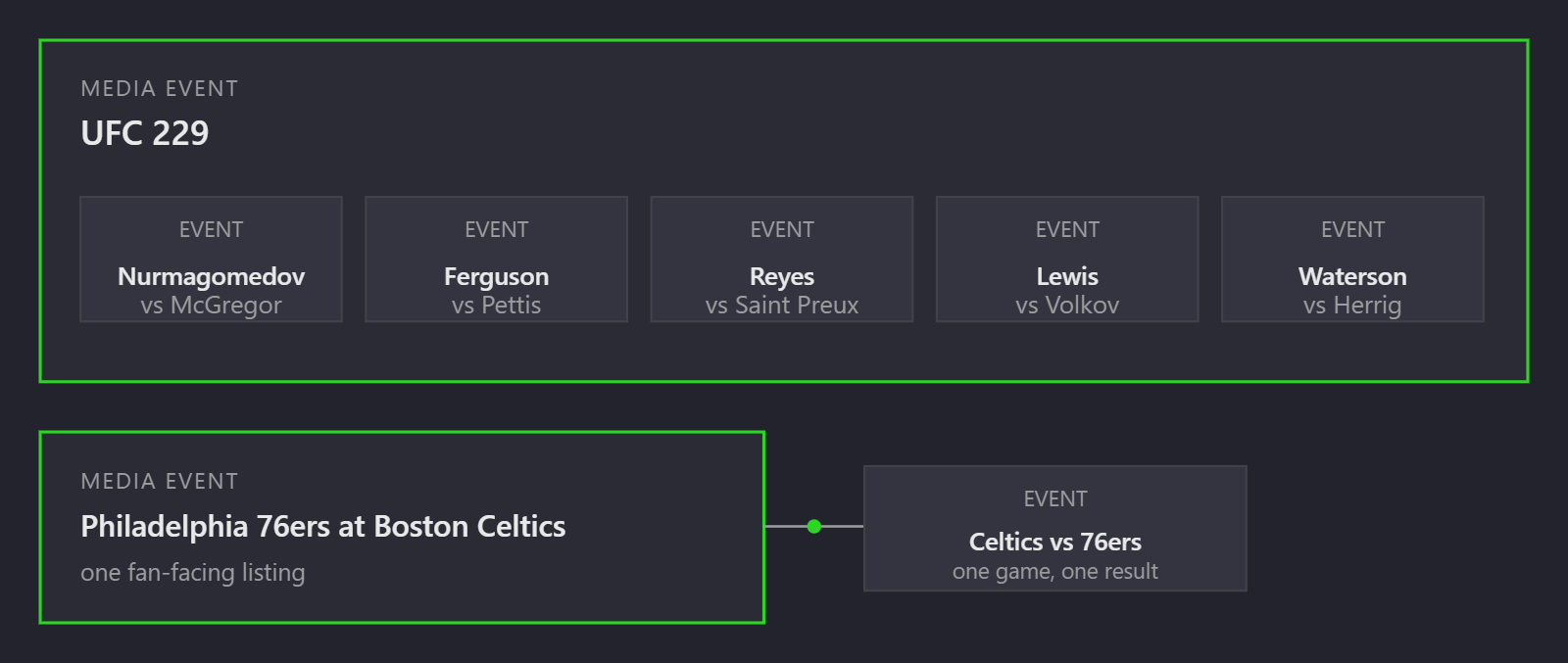
Because the Media Event is linked to its Events, a system that only knows the fan-facing listing can still reach the underlying results, and a system that only knows an individual fight can still find the broadcast it belongs to.
One ID, many systems
Every record in SDX, Media Events included, gets a permanent identifier. Media Event IDs start with mevent_, followed by a unique string. Once an ID exists, it does not change.
That matters because sports and streaming rarely share a vocabulary. A scheduling system might call something “UFC 229.” A statistics feed might call it five fights. An ad platform might know it by a campaign code. Without a common reference, every connection between two systems means building and maintaining a custom lookup table, and keeping it correct as schedules change.
With SDX, each system maps to the shared ID once. After that, any two systems that have mapped to SDX can line up the same event without a one-off translation between them.
What this means for your team
You do not need to write code to feel the difference. Here is how the same idea shows up in different jobs:
| If you work in… | The everyday problem | How Media Events help |
|---|---|---|
| Programming and scheduling | The broadcast listing and the stats feed describe the same night in different ways. | The listing and the underlying results share a reference, so they stay connected as schedules change. |
| Product and app teams | A single “watch now” tile has to show live scores for several contests. | One Media Event points to every Event inside it, so the tile can pull the right data for each. |
| Advertising and partnerships | Sponsorship and inventory are sold against the show or the card, but performance is reported by contest. | A shared ID lets you tie the commercial view of an event to the sporting one. |
| Marketing and editorial | Content is published about “the main event,” and it is hard to connect it to the right data. | One stable ID for the Media Event keeps content, data, and broadcast references aligned. |
| Betting, fantasy, and analytics | Results are tracked per contest, but audiences and reporting are organized per broadcast. | The link between a Media Event and its Events lets you move between both views. |
| Data and engineering | Every new data partner means another mapping table to build and maintain. | Map to the shared SDX ID once instead of building each pairing separately. |
A few things worth knowing
- SDX is the connective tissue, not the schedule. SDX gives events a shared identity, including the date of the event in UTC, so you can match them to the licensed schedules and data you already use. Those sources still provide times, statuses, and live details.
- Names are for people, IDs are for systems. “Boston Celtics-Philadelphia 76ers” and “Philadelphia 76ers at Boston Celtics” are the same night. The ID is what keeps your systems from confusing them.
- The relationship goes both ways. You can start from a Media Event and find its Events, or start from an Event and find the Media Event it belongs to.
Where to go from here
Media Events are one part of a wider structure that also covers sports, competitions, events, teams, people, and venues. To see how the pieces fit together, read about the SDX data structure, or if you are comfortable with a little SQL, the help center guide Understanding the SDX database schema shows how Media Events connect to Events in the database itself.
Want to see what a shared ID layer could do for your sports and streaming workflows? Get in touch and we will walk you through it.

